Introduction to Routing
In this article, I will discuss Routing in ASP.NET Core MVCย applications with examples. You can read more tutorial articles on minimal APIs in ASP.NET Core from here. For more .NET articles, make sure to follow the website and bookmark it.
What is Routing in ASP.NET MVC Core?
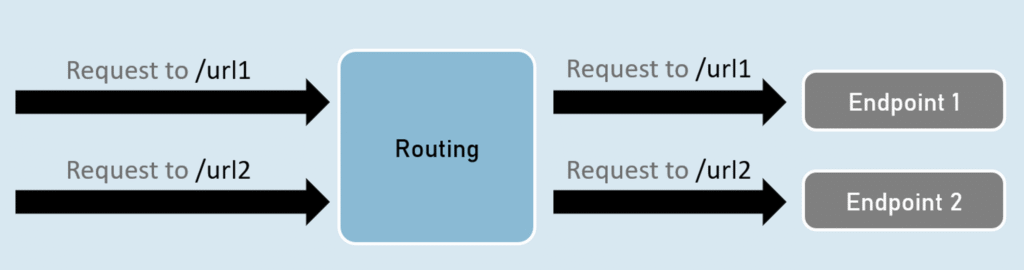
At its heart, routing is the mechanism that ASP.NET Core uses to match incoming HTTP requests to specific endpoints (e.g., controller actions, Razor Pages, or minimal API handlers) within your application. This allows you to define clean and meaningful URLs that clearly indicate the resources or actions being requested. It enables the framework to determine what code to execute based on the URL of the request. Routing is the most important Component in ASP.NET MVC Core. Before any .NET interview, ensure you have a clear understanding of the concept. Happy Coding!!!
How does Routing work in ASP.NET Core?
Routing is one of the core building blocks of ASP.NET Core โ it decides how incoming HTTP requests are mapped to endpoints (controllers, Razor Pages, or middleware).
ย
In ASP.NET Core, routing is like a traffic controller for web requests. Whenever a client sends an HTTP request, the routing system steps in to check where that request should go.
Hereโs how it works:
-
The routing engine receives the request.
-
It then looks for a route pattern that matches the requested URL.
-
Each route pattern tells ASP.NET Core which controller, action method, HTTP method (GET, POST, PUT, DELETE, etc.), and parameters should handle the request.
๐ If a match is found, the request is passed on to the right controller and action method.
๐ If no match is found, ASP.NET Core returns a 404 Not Found error to the client.
ย
In short, routing is the process of matching URLs to the right piece of code in your application.
What are the Types of Routing in ASP.NET Core?
We can configure routes in the ASP.NET Core MVC Web Application in two ways. They are as follows:
- Convention-Based Routing
- Attribute-Based Routing.
What is Conventional-Based Routing in ASP.NET Core MVC Web Application?
Conventional routing uses predefined route patterns (usually defined in Program.cs) to decide which controller and action should handle a request. It follows a convention like:
{controller}/{action}/{id?}
app.MapControllerRoute(
name: "default",
pattern: "{controller=Home}/{action=Index}/{id?}");
How it works:
-
The route pattern is set once.
-
Any URL that matches the pattern is automatically mapped to the right controller and action.
When to use:
-
In traditional MVC apps.
-
When routes are predictable and follow a fixed convention.
What is Attribute-Based Routing in ASP.NET Core MVC Web Application?
Attribute-based routing in ASP.NET Core MVC allows developers to define routing directly on controller actions or at the controller level using attributes (decorators).ย
ย
How it works:
You decorate controllers or actions with [Route], [HttpGet], [HttpPost], etc.
ย
[Route("products")]
public class ProductsController : Controller
{
[HttpGet("details/{id:int}")]
public IActionResult Details(int id)
{
return View();
}
[HttpPost("create")]
public IActionResult Create(Product product)
{
// save product
return RedirectToAction("Index");
}
}
When to use:
-
In Web APIs (most common).
-
When you want fine-grained control over URLs.
-
When routes donโt always follow the same convention.
Routing pipeline & middleware order (why order matters)
Routing in ASP.NET Core uses two important middleware stages:
-
app.UseRouting()โ matches the incoming request to an endpoint. -
app.UseEndpoints(...)(orapp.Map*in minimal hosting) โ executes the selected endpoint.
Because routing is split into matching and execution, middleware order matters. For example, UseRouting() must run before authentication/authorization so those middleware can make decisions based on route information; and UseAuthorization() must run before endpoint execution. See the ASP.NET Core middleware docs for recommended ordering.
app.UseRouting();
app.UseAuthentication(); // after UseRouting
app.UseAuthorization(); // after UseRouting, before UseEndpoints
app.UseEndpoints(...); // executes endpoint
What is Route template syntax?ย
-
Literals:
/products/list -
Parameters:
{id}captures one segment into route data. -
Optional:
{id?}โ parameter may be missing. -
Defaults:
{controller=Home}gives a default value if not supplied. -
Constraint:
{id:int}โ only match whenidparses to int. -
Catch-all:
{*path}โ captures multiple segments (useful for SPA fallback or file paths). -
Tokens:
[controller],[action],[area]โ replaced with current controller/action/area name when used on attributes.
{area:exists}/{controller=Home}/{action=Index}/{id:int?}
Understanding Routing in ASP.NET Core MVC Application:
Create a new MVC project (CLI)
dotnet new mvc -n RoutingDemo
cd RoutingDemo
dotnet run
Minimal Program.cs (ASP.NET Core 6/7/8 style)
ย
var builder = WebApplication.CreateBuilder(args);
builder.Services.AddControllersWithViews();
var app = builder.Build();
if (!app.Environment.IsDevelopment()) {
app.UseExceptionHandler("/Home/Error");
app.UseHsts();
}
app.UseHttpsRedirection();
app.UseStaticFiles();
app.UseRouting();
// Authentication/Authorization go here if needed
// app.UseAuthentication();
// app.UseAuthorization();
app.MapControllerRoute(
name: "areas",
pattern: "{area:exists}/{controller=Home}/{action=Index}/{id?}");
app.MapControllerRoute(
name: "default",
pattern: "{controller=Home}/{action=Index}/{id?}");
app.Run();
MapControllerRoute defines conventional routes that the routing system will use.
Example of Conventional controller (ProductsController.cs)
public class ProductsController : Controller
{
// Matches: /Products/Details/5
public IActionResult Details(int id)
{
return Content($"Conventional: Product {id}");
}
// Matches: /Products/List
public IActionResult List()
{
return View();
}
}
Example of Attribute routing (same controller with attributes)
[Route("catalog")]
public class CatalogController : Controller
{
// Matches: GET /catalog/details/5
[HttpGet("details/{id:int}")]
public IActionResult Details(int id) => Content($"Attribute: Product {id}");
// named route
[HttpGet("items/{id:int}", Name = "CatalogItem")]
public IActionResult Item(int id) => Content($"Item {id}");
}
Routing Example for Razor Page (Pages/Product/Details.cshtml.cs)
At top of .cshtml file or page model:
ย
@page "{id:int}"
@model ProductDetailsModel
// In PageModel
public IActionResult OnGet(int id) { ... }
Quick FAQ
Q: Where should I put
UseAuthentication()?
AfterUseRouting()and beforeUseEndpoints()so authentication can use route information (e.g., policies that depend on route parameters). Microsoft LearnQ: Attribute or conventional โ which to choose?
For APIs and precise control use attribute routing. For standard MVC page flow (CRUD pages), conventional routing is often simpler. You can mix them.
Summary
Routing matches URLs to endpoints (controllers, Razor Pages, minimal APIs) and is responsible both for matching and link generation. Microsoft Learn
Put
UseRouting()early, andUseEndpoints()where you want the matched endpoint executed; order affects auth and other middleware. Microsoft LearnUse conventional routing for broad, pattern-based URL handling; use attribute routing for fine-grained control and Web APIs. Microsoft Learn
Use route constraints to make routes precise and
LinkGeneratororUrlHelperto generate URLs.
ย Letโs Connect & Learn Together!
I hope this article about routing in ASP.NET Core helps you grow in your .NET developer journey in 2025 and beyond. I regularly share coding resources, learning roadmaps, project ideas, and career tips across multiple platforms. If you found this helpful, consider following me and joining the Logic Lense community!
ย Instagram โย @logiclense
ย YouTube โย Logic Lense
ย LinkedIn โย Connect with me
ย Website โย www.logiclense.com
Letโs code, grow, and innovate โ together.ย
Subscribe to ASP.NET Core Newsletter.
Want to advance your career in .NET and Architecture? Join 1,000+ readers of my newsletter. Each week you will get 1 practical tip with best practices and real-world examples.